Usage
We made Marao Dashboard easy to use but you need to know a few basics.
Variables and entries
All of the cards are using the default entries from Home Assistant and variables set in the template cards from Marao Dashboard. Almost most of the cards require at least one of them and sometimes both.
For example, the light cards requires you to add a light entity which you can enter through the entity: entry.
  - type: custom:marao-card
    template: hc_light_card
    entity: light.livingroom
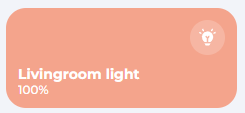
It is also possible to change the name of the light by giving the name: entry, like so:
  - type: custom:marao-card
    template: hc_light_card
    entity: light.livingroom
    name: My Awesome Light
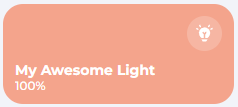
With variables, you can change certain aspects in the card, eg. enabling the slider
  - type: custom:marao-card
    template: hc_light_card
    entity: light.livingroom
    name: My Awesome Light
    variables:
      enable_slider: true
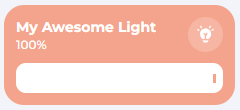
Every card you will see on this documentation page have all the needed and optional variables described. Based on round color, you can see if its a Home Assistant default Entry or a variable from Marao Dashboard.
Legend: Home Assistant Entry - Marao Dashboard variable
Included templates
Marao Dashboard includes project-owned templates for more specific devices and workflows. These are documented in this cards section:
hc_cover_cardhc_camera_cardhc_battery_cardhc_dishwasher_cardhc_number_cardhc_toggle_graph_cardhc_vacuum_cardhc_washing_machine_card
Table of contents
- Battery Card
- Camera Card
- Climate Card
- Cover Card
- Dishwasher Card
- Fan Card
- Glance card
- Graph Card
- Header card
- Light Card
- Media Card
- Navigation Card
- Navigation bar card
- Number Card
- Scene card
- Security Card
- Sensor Card
- Switch Card
- Title Card
- Toggle Graph Card
- Vacuum Card
- Washing Machine Card
- Weather Card